What actually happens when you sign in with a passkey
Follow one sign-in from the device prompt to the server, and the difference between a fingerprint and a credential becomes clearer.
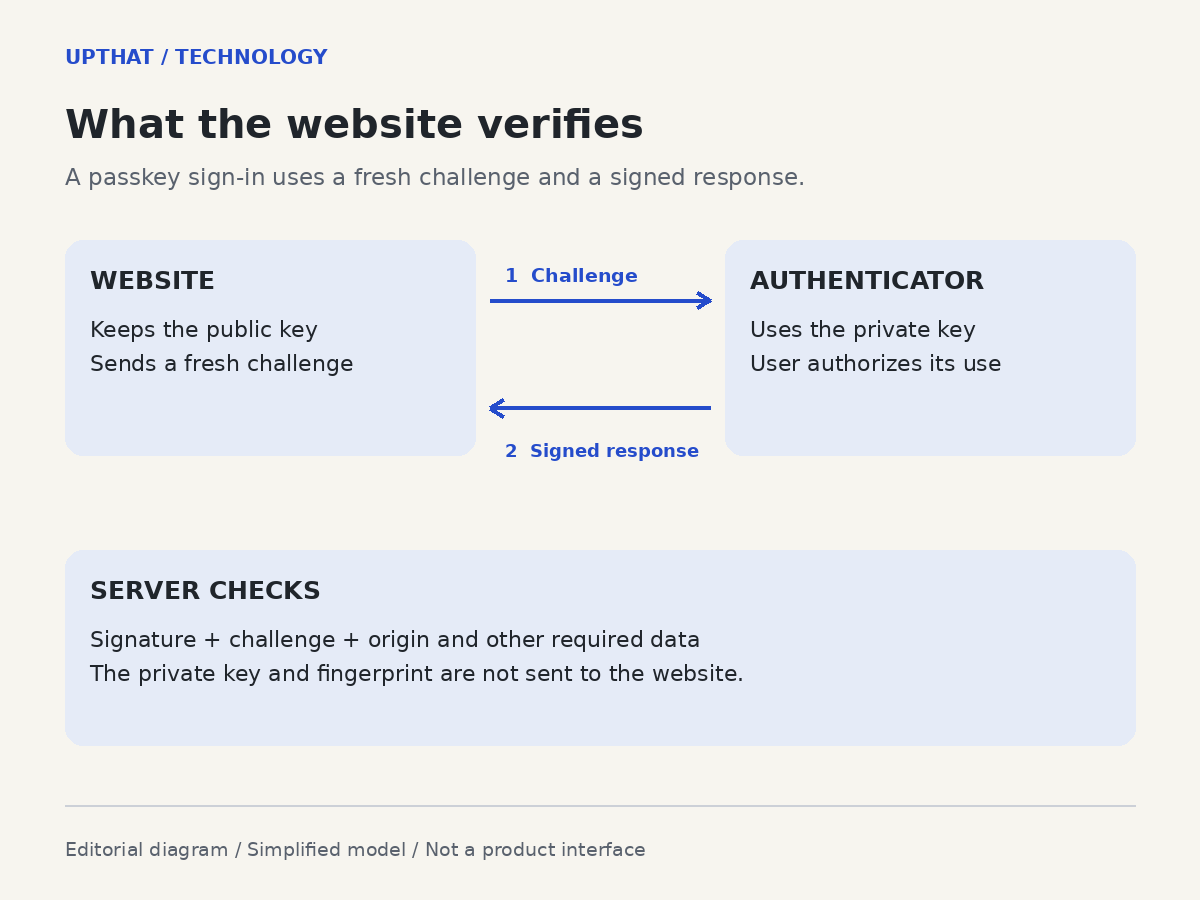
Your fingerprint can unlock a passkey sign-in, but the website does not need a copy of that fingerprint to recognize you. Google describes the screen lock—whether a fingerprint, face recognition or PIN—as the way you authorize use of the credential. What reaches the service is a cryptographic response.
That distinction is easy to miss because the visible action is so brief. To understand it, follow the exchange behind the prompt.
At registration, an authenticator creates a credential with a public and private key. The website registers the public key against the account. The private key is used by the authenticator; it is not handed to the website as the account's reusable secret.
On a later visit, the server sends a fresh challenge. After the required interaction, the authenticator produces a signed response. The server checks the signature with the registered public key and checks the challenge and other required data. A response from an earlier sign-in should not satisfy a new challenge.
The important change is what the server can do with the material it holds: a public key lets it verify a response without giving it the private key needed to create one.
A lookalike page cannot simply collect the same credential
WebAuthn scopes credentials to a relying party, and the authentication response includes origin information. The service must validate that information. This ties the exchange to the intended service rather than asking someone to recognize every convincing imitation by eye.
That is the basis for phishing resistance in this sign-in flow. It is not a promise that an account can never be compromised. Implementation checks, recovery routes and the rest of the application still matter.
Where will the passkey be tomorrow?
FIDO distinguishes credentials synced through a provider from credentials bound to one device. The same word, passkey, therefore does not tell you whether access will follow you to another phone.
For a synced credential, the provider and its restoration process become part of the practical access story. With a device-bound credential, having that authenticator available matters. FIDO also describes cross-device sign-in, in which a credential on one device can authorize a session on another.
The practical implication is to check two things separately: where a service lets you sign in with a passkey, and how it lets you regain access when that credential is unavailable. A passwordless button answers the first question. It does not, by itself, answer the second.
Publication history
— First published.
How this was made
UpThat uses AI-assisted research and writing. Source checking and publication follow our editorial review workflow. See the original documents above to assess the reporting.
How we use AI ↗